🧩 The Marketplace

Seven essentials. Thirteen extras. Your pick.

Every project starts with the essentials. Open the Marketplace and add whatever else your team needs: check-ins, milestones, time tracking, a CRM, a domain manager and more. Every one is free, and taking one away never deletes a thing.

How it works

A project that fits
the way you work.

  1. Start with the essentials. Stream, Tasks, Boards, Files, Calendar, Chat and Meetings are ready the moment you make a project.
  2. Add from the Marketplace. One click and it’s there for everyone in the project, with its own card on the project page.
  3. Take away what you don’t use. It’s only hidden. Add it back and everything in it is just where you left it.

Project admins choose what a project uses. Everyone in the project can browse the Marketplace.

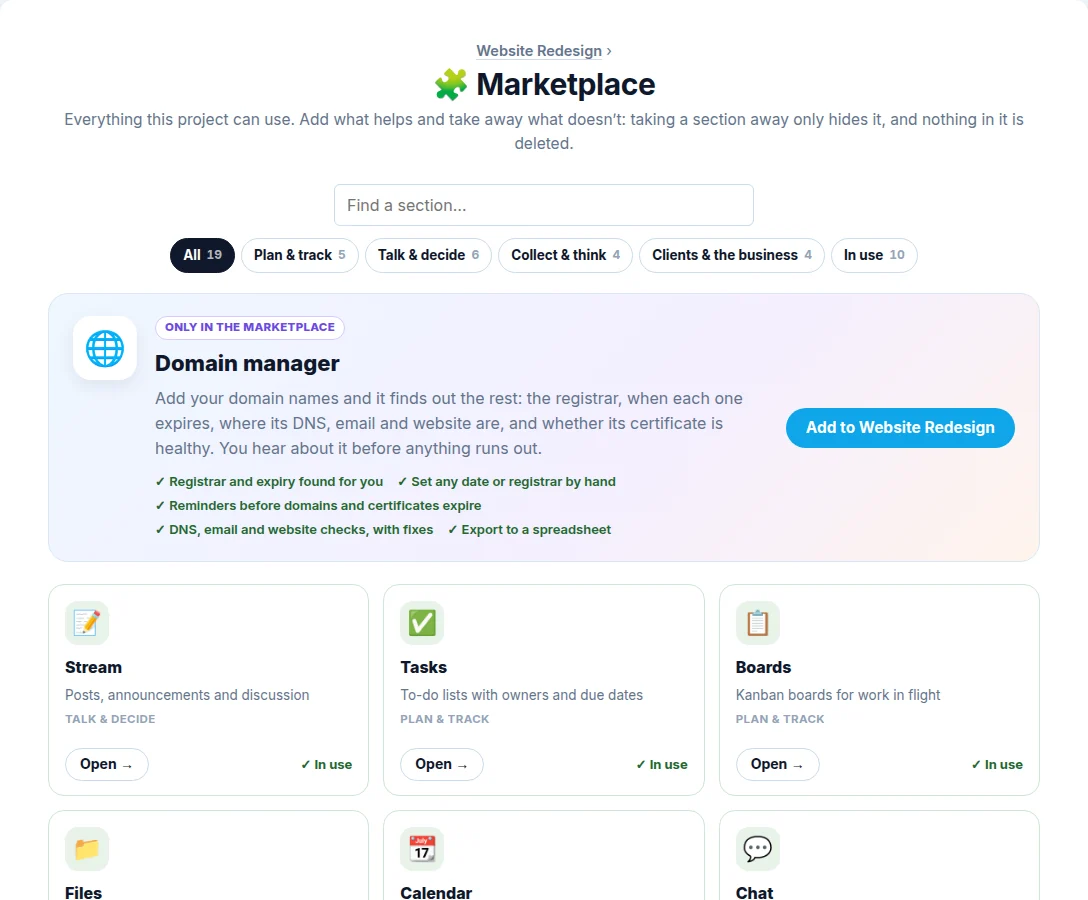
The Marketplace in a project: the Domain manager featured at the top, then cards for Stream, Tasks, Boards and the rest, each marked In use or ready to add

New in the Marketplace

Just added.

The newest sections, free like the rest.

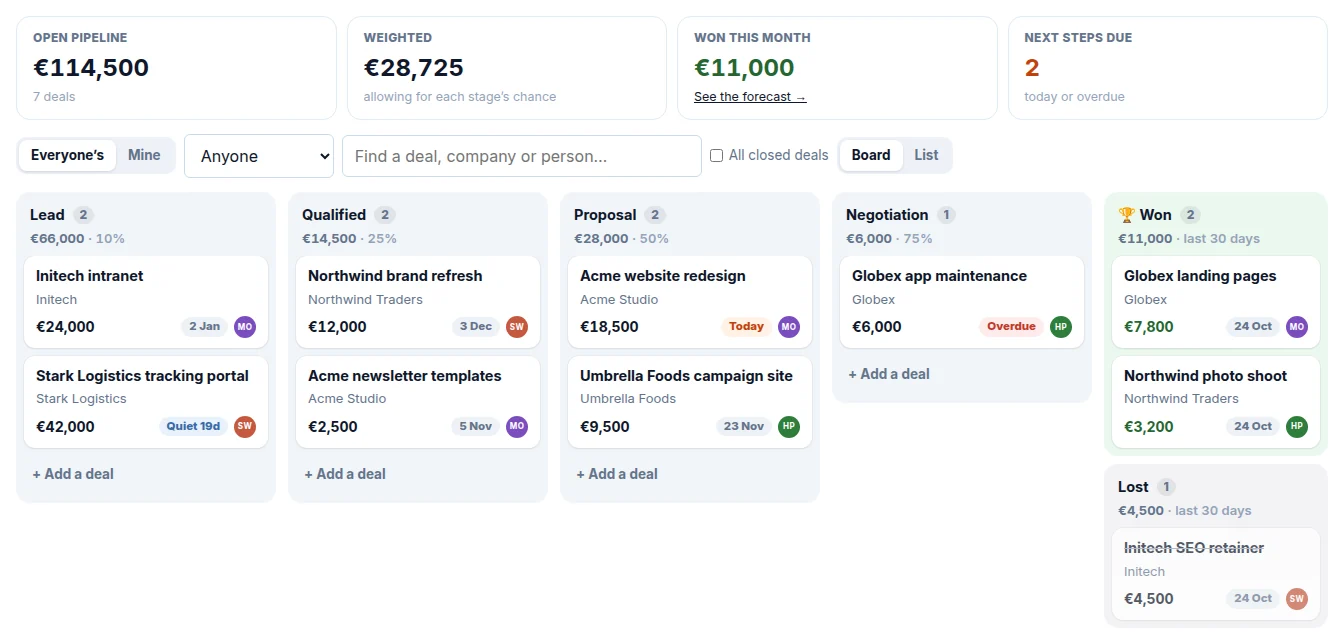
The CRM pipeline: deals in Lead, Qualified, Proposal and Negotiation columns, each with its value, company, owner and next step

💼 CRM

Deals in a pipeline you drag along, with the people and companies behind them, the next step for each, a nudge when one goes quiet, and a forecast.

See what it does →
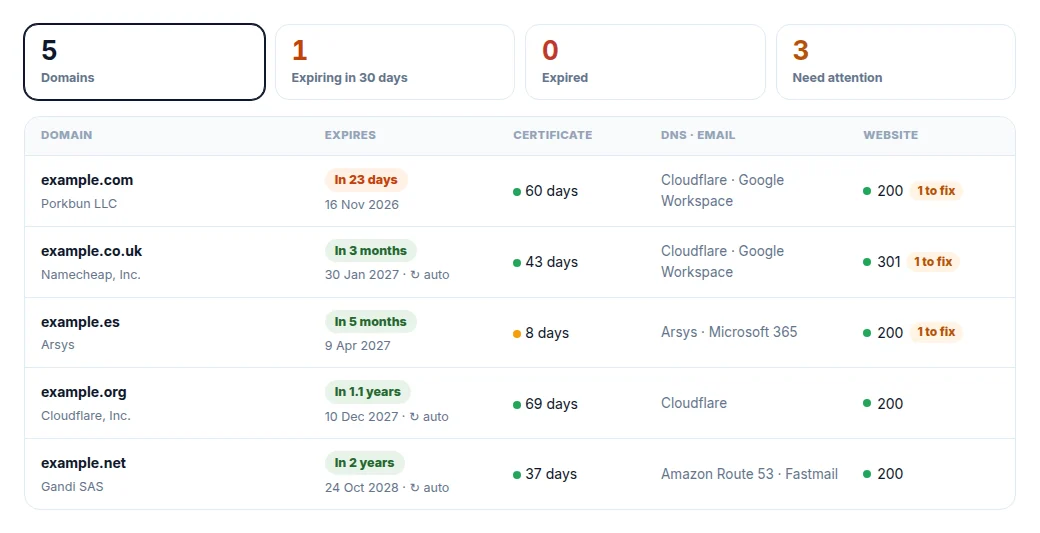
The Domain manager: five domains with when each expires, its certificate, DNS and email, and how many things need fixing

🌐 Domain manager

Paste your domain names. It finds the registrar and expiry date, checks the DNS, email and certificate, and reminds you before anything runs out.

See what it checks →

Plan & track

Keep the work moving: who’s doing what, by when, and how close you are.

✅ In every project

Tasks

Lists of what needs doing, who’s doing it and by when, with checklists, labels, priorities and repeating tasks.

  • Owners, due dates and checklists
  • Repeating tasks
  • Business mode: workflow states, priorities, labels and task IDs
  • A morning round-up of what’s due
📋 In every project

Boards

Cards moving across columns, Trello-style, for work that flows through stages.

  • Drag cards and columns
  • Labels, owners, due dates and covers
  • Checklists, files and comments on cards
  • A limit on how much each column holds
  • Templates: roadmap, bug tracker, sales pipeline and more
📆 In every project

Calendar

The project’s dates: events, deadlines and milestones on one calendar, with invitations and reminders.

  • Month, week, day and list views
  • Events with invitations and replies
  • Reminders by email
  • Tasks, milestones and domain renewals alongside
  • Subscribe from Google, Apple or Outlook
🏁 Marketplace

Milestones

The big dates and how close you are to them, worked out from the tasks and cards tied to each.

  • A timeline of what’s coming
  • Progress worked out from linked tasks and cards
  • On the calendar too
🤖 Marketplace

Automations

“When this happens, do that”: rules that take the busywork off everyone’s hands.

  • When a card moves, a task is done or something’s overdue
  • Or on a schedule
  • Assign, set due dates, move, label, comment and post

Talk & decide

Decide things together without another meeting.

📝 In every project

Stream

One place for the things everyone should read: announcements, proposals, updates. Each post keeps its own discussion, so nothing gets lost in chat.

  • Rich posts with images and files
  • Comments, reactions and @mentions
  • Drafts, and posts scheduled for later
  • Pin what matters, follow what you care about
  • “Catch me up”: what you missed, summed up
💬 In every project

Chat

A running conversation for the quick stuff that doesn’t need a post.

  • Live chat for the whole project
  • @mentions
  • Polls right in the chat
🎥 In every project

Meetings

Video calls, or a notetaker for meetings in the room, with a summary and actions when you finish.

  • Joins Google Meet, Zoom and Teams calls
  • Records meetings in the room too
  • Notes, decisions and actions written for you
  • A brief before the call
  • Email the notes to everyone
More about Meetings →
🙋 Marketplace

Check-ins

Recurring questions, like “What did you work on today?”, asked at each person’s own time, with answers in one place.

  • Daily or weekly, at each person’s own time
  • Answer on the page or by replying to the email
  • An AI summary of the answers
📣 Marketplace

Status updates

A regular status update, on track or at risk, drafted for you from the week’s work.

  • Drafted for you from the week’s work
  • On track, at risk or off track
  • A link to share with clients
🗳️ Marketplace

Polls

Ask a question, get an answer: single or multiple choice, anonymous if you like, closing on its own.

  • In the stream or chat
  • Anonymous voting
  • Results announced when it closes

Collect & think

Ideas, links, email and files, kept where everyone can find them.

📁 In every project

Files

Documents written right here, and files uploaded, in folders everyone can find.

  • Write docs right here
  • Upload any file, or whole folders
  • Previews for images, PDFs, video and audio
  • Version history and a 30-day trash
  • Share links for people outside the project
📧 Marketplace

Email in

The project gets its own email address: forward anything to it and it lands where it should.

  • Forwarded email becomes a post, task or card
  • Attachments come along
  • Answer check-ins by replying
🧠 Marketplace

Mind maps

An idea in the middle, branches off it. Brainstorm, plan or untangle a problem, then turn branches into tasks.

  • Type to add, drag to move
  • AI suggestions for branches
  • Turn a branch into tasks
  • Export as a picture

Clients & the business

The work around the work: clients, time, releases and domains.

🚀 Marketplace

Releases

Turn what got done into release notes, and keep a changelog your users can read.

  • Drafted from finished tasks and cards
  • A public changelog page and feed
  • Let people know when it ships
📇 Marketplace

Contacts

The people the project deals with, and every call, email and meeting with them.

  • Clients, suppliers and leads
  • Every call, email and meeting logged
  • Import and export as CSV
⏱️ Marketplace

Time

Track time on tasks and cards with a timer or by hand, and see what it comes to.

  • Timers on tasks and cards
  • Weekly timesheets
  • Billable rates and totals
  • Export for invoicing
🌐 New

Domain manager

Add your domain names and it finds out the rest: the registrar, when each one expires, where its DNS, email and website are, and whether its certificate is healthy. You hear about it before anything runs out.

  • Registrar and expiry found for you
  • Set any date or registrar by hand
  • Reminders before domains and certificates expire
  • DNS, email and website checks, with fixes
  • Export to a spreadsheet
💼 New

CRM

Every deal from first chat to signed: drag it through your stages, keep the people and companies together, and always know the next step. It uses your contacts, so adding it brings Contacts along too.

  • A pipeline board you drag deals across
  • Companies, with their people and deals
  • Next steps, and a nudge when a deal goes quiet
  • Calls, emails and meeting notes on each deal
  • A forecast: pipeline, win rate and what’s likely to close
  • Automations when a deal is won or moves on
And in every project, whatever you add.

🐻‍❄️

The AI assistant

Ask in plain words and it does the busywork, in every section you use. It checks with you first.

✨

Ask the project

“What did we decide about pricing?” Answers from everything in the project, with links to where it came from.

🔐

Access, section by section

Give someone just the sections they need, to view or to edit, and even just some task lists, boards or folders.

🔔

Notifications

What happened since you last looked, from every section, with emails you can switch off one by one.

Build the project you need.

Start with the essentials and add the rest when you want it. All of it free.

Create your free account